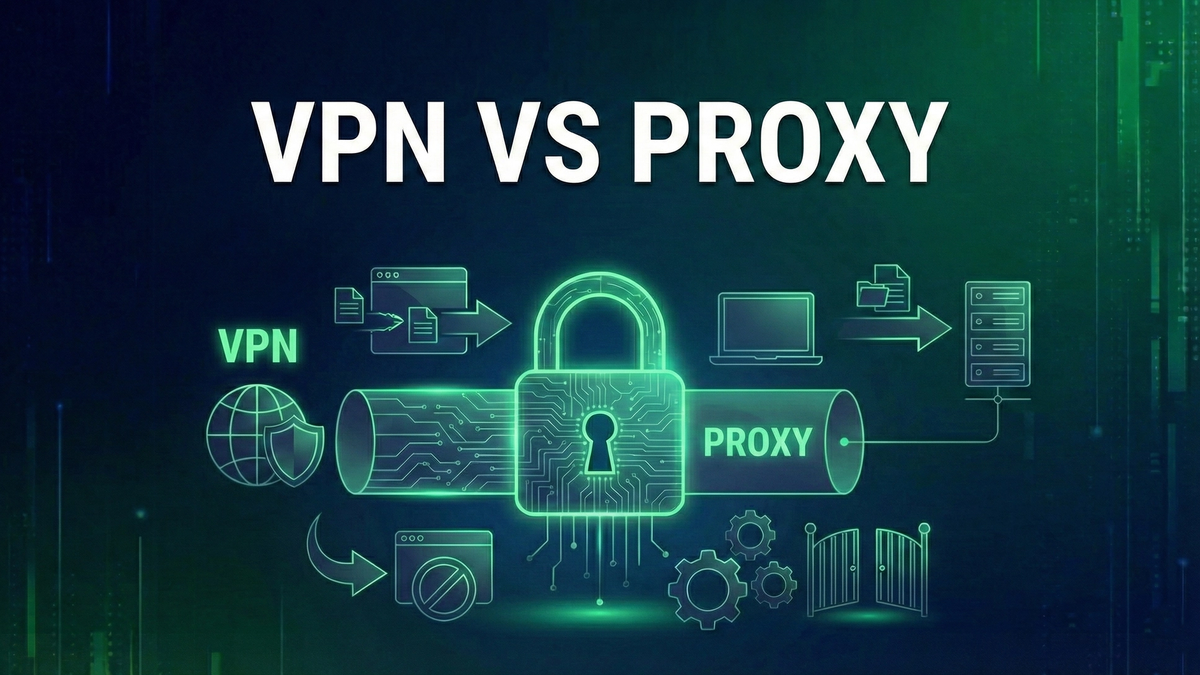
VPN vs Proxy: What's the Difference? A Complete Comparison Guide
Learn the key differences between VPNs and proxies, including encryption, security, speed, and privacy. Find out which solution is right for your needs.
When researching online privacy tools, you'll inevitably encounter two options: VPNs and proxies. Both can hide your IP addressIP Address🔐A unique numerical identifier assigned to every device connected to the internet. and help you access geo-restricted content, but they work very differently and offer vastly different levels of protection. Understanding these differences is crucial for choosing the right tool for your needs.
This guide breaks down exactly how VPNs and proxies work, their key differences in security, speed, and functionality, and helps you decide which solution fits your specific use case. Whether you're concerned about privacy, trying to access blocked content, or both, you'll know exactly what each option can and cannot do.
What is a Proxy Server?
A proxy server acts as an intermediary between your device and the internet. When you connect through a proxy, your web requests go to the proxy server first, which then forwards them to the destination website. The website sees the proxy's IP address instead of yours, providing a basic level of anonymity.
Think of a proxy like a middleman who retrieves packages for you. You tell the middleman what you want, they go get it, and bring it back. The store never sees you directly—they only interact with the middleman. However, your communication with the middleman isn't necessarily private.
Types of Proxy Servers
HTTP proxies are the most common type, designed specifically for web traffic. They work with HTTP and HTTPS websites but don't handle other types of internet traffic like email clients, gaming, or file transfers. They're simple to set up but limited in scope.
SOCKS proxies (particularly SOCKS5) are more versatile. They can handle any type of internet traffic—web browsing, email, torrenting, gaming, and more. SOCKS5 also supports authentication, adding a layer of access control. They're slower than HTTP proxies but far more flexible.
Transparent proxies don't hide that you're using a proxy. They're often used by organizations to filter content or cache frequently accessed websites. You might be using one right now without knowing—many corporate networks and schools deploy them.
What is a VPN?
A Virtual Private Network (VPN) creates an encrypted tunnel between your device and a VPN server. All your internet traffic—not just web browsing—travels through this tunnel, protected from observation. The VPN server then forwards your traffic to its destination, masking your real IP address.
Using the package analogy: a VPN is like having a private, armored courier service. Everything you send is locked in a secure container that only you and the courier company can open. Even if someone intercepts the container, they can't see what's inside. And like a proxy, the final destination only sees the courier, not you.
How VPN EncryptionEncryption🛡️The process of converting data into a coded format that can only be read with the correct decryption key. Works
When you connect to a VPN, your device and the VPN server establish a secure connection using encryption protocols like OpenVPNOpenVPN🔐An open-source VPN protocol widely considered secure and reliable, though slower than WireGuard., WireGuardWireGuard🔐A modern, lightweight VPN protocol known for high speeds and strong security., or IKEv2. Your device encrypts all outgoing data before it leaves, and only the VPN server can decrypt it.
This encryption typically uses AES-256, the same standard used by governments and militaries worldwide. Even if someone intercepts your traffic—your ISP, a hacker on public WiFi, or a government surveillance program—they see only scrambled data. Without the encryption keys, decrypting this data would take billions of years with current technology.
Key Differences: VPN vs Proxy
Encryption and Security
This is the most critical difference. VPNs encrypt all your traffic end-to-end. Proxies typically provide zero encryption—your data travels in plain text between you and the proxy server. Some HTTPS proxies encrypt the connection to the proxy, but this is inconsistent and often poorly implemented.
The security implications are significant. On public WiFi, using a proxy leaves you vulnerable to man-in-the-middle attacks, packet sniffing, and session hijackingSession Hijacking🛡️An attack where an adversary takes over a legitimate user session by stealing or predicting session tokens, gaining unauthorized access to systems or data.. A VPN protects against all of these threats. If security is a concern—and it should be—a VPN is the clear choice.
Traffic Coverage
VPNs protect all internet traffic from your device, regardless of the application. Your web browser, email client, messaging apps, games, streaming services—everything goes through the encrypted tunnel automatically once connected.
Proxies typically work on a per-application basis. You configure your browser to use the proxy, but your other apps continue connecting directly. This means your torrent client, gaming sessions, or video calls might expose your real IP while your browser shows the proxy's IP. Some users don't realize this and think they're fully protected when they're not.
Speed and Performance
Proxies are generally faster because they don't encrypt your traffic. The proxy server simply forwards your requests without the computational overhead of encryption and decryption. For basic web browsing where speed matters more than security, proxies can be snappier.
VPNs add latencyLatency🌐The delay between sending a request and receiving a response, measured in milliseconds (ping). due to encryption processing and potentially longer routing paths to VPN servers. However, modern VPN protocols like WireGuard have dramatically reduced this overhead. Premium VPNs with optimized server networks often deliver speeds nearly indistinguishable from direct connections. The small speed sacrifice is worth the security benefits for most users.
Privacy and Logging
Reputable VPN providers operate under strict no-logs policies, meaning they don't record your browsing activity, connection times, or IP addresses. Many have undergone independent audits to verify these claims. This matters if privacy is your goal.
Free proxy servers are notoriously untrustworthy. Many log everything you do and sell that data to advertisers or worse. Some inject ads into your browsing or even malware. The proxy operator can see all your unencrypted traffic—every password, every message, every website. Even paid proxy services rarely offer the privacy guarantees that quality VPNs provide.
Cost
Basic proxy servers are often free, which explains their popularity. However, free services have significant drawbacks: slow speeds, unreliable connections, potential malware, and the likelihood that you're the product being sold.
Quality VPNs require a subscription, typically $3-12 per month depending on the provider and subscription length. This cost covers server infrastructure, bandwidthBandwidth🌐Maximum data transfer rate of a network connection, measured in Mbps or Gbps., development of security features, and independent security audits. For most users, a few dollars monthly is a reasonable price for genuine privacy and security.
Side-by-Side Comparison
Here's a quick reference comparing the two technologies across key factors:
When to Use a VPN
Choose a VPN when security and privacy matterMatter🏠A new universal smart home standard backed by Apple, Google, and Amazon for cross-platform compatibility.:
When a Proxy Might Suffice
Proxies can work for limited, low-risk scenarios:
Common Misconceptions
"A proxy hides my activity from my ISP"
False. Your ISP can see that you're connecting to a proxy server and can still see your traffic if it's not encrypted with HTTPS. Only a VPN fully hides your browsing activity from your ISP through encryption.
"Free VPNs are just as good as paid ones"
Generally false. Free VPNs often have data caps, slow speeds, limited server options, and questionable privacy practices. Many have been caught logging user data or containing malware. If you're not paying for the product, you likely are the product.
"VPNs make me completely anonymous"
Not quite. VPNs significantly improve privacy but don't guarantee anonymity. Websites can still track you through cookies, browser fingerprinting, and account logins. A VPN is one layer of privacy protection, not a complete anonymity solution.
"Proxies are secure because websites show HTTPS"
Misleading. HTTPS encrypts the connection between the proxy and the website, but your connection to the proxy might be unencrypted. The proxy operator can potentially see your traffic even when visiting HTTPS sites.
Making Your Choice
For most users, a VPN is the better choice. The security and privacy benefits far outweigh the small additional cost and minor speed reduction. Modern VPNs are easy to use—download an app, click connect, and you're protected.
Consider a proxy only if you have a very specific, limited use case where security doesn't matter. Even then, understand the risks. That free proxy you found might be logging everything you do or injecting malware into your browsing sessions.
If budget is a concern, look for reputable VPN providers offering deals—many drop to $2-3 per month with annual subscriptions. That's less than a cup of coffee for a month of genuine online protection.
Conclusion
VPNs and proxies both hide your IP address, but the similarities largely end there. VPNs provide comprehensive protection through encryption, covering all your internet traffic and keeping your activities private from ISPs, hackers, and surveillance. Proxies offer a quick, often free way to mask your IP for basic tasks but provide minimal security.
In an era of increasing online threats, data breaches, and privacy erosion, investing in a quality VPN makes sense for anyone who values their digital security. Proxies have their place for specific technical tasks, but they're not a substitute for proper protection.
Whatever you choose, understand what protection you're actually getting. Don't let a false sense of security from a free proxy lead you to take risks you wouldn't otherwise take. When it comes to online privacy and security, you generally get what you pay for.
Keep Learning
Related Reviews
NordVPN Review: Industry-Leading Security with Impressive Speed
NordVPN continues to dominate the VPN market with its combination of strong security, fast speeds, and innovative features like Meshnet. While it has a few shortcomings in Asia-Pacific performance, it remains one of the best VPN services available.

Best VPNs for 2025: Top Pick for Privacy, Streaming, and Security
Our top VPN recommendation for 2025 delivers fast speeds, servers in 90+ countries, military-grade encryption, and reliable streaming access—everything you need for online privacy.
REOLINK 4K Security Camera System Review: Professional PoE Surveillance at DIY Prices
The REOLINK 4K PoE security system delivers 8MP clarity, smart person/vehicle detection, 24/7 recording with 4TB storage, and plug-and-play installation for comprehensive home surveillance.